Please click an image or link above. Also, please visit Tutorials and
Support for user guides
and best practices manuals.
Please click an image or link above. Also, please visit Tutorials and
Support for user guides
and best practices manuals.
 MD6000 Modular MeshTM
Slot Based Design
MD6000 Modular MeshTM
Slot Based Design
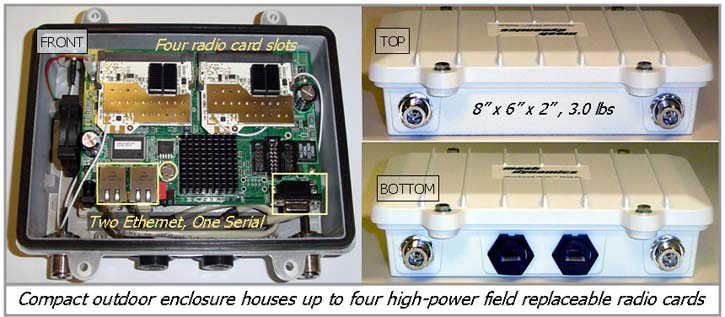
Meshdynamics MD4000 (legacy) nodes supported up to 4 radios
in one outdoor enclosure. [Picture]
Meshdynamics MD6000 (OpenWRT) supports up to 6
radios based on the
Gateworks Ventana Family
This provides extensive customization of board
features. Two popular configurations are:
Ventana 5520 - a two slot board replacement for the
single radio MD1000 series
Ventana 5530 - a four slot board replacement for
the Legacy MD4000.
Slot 0, & Slot 1 uplink
and downlink form the basic backhaul, operating on 5.8GHz, 4.9GHz
or 2.4Ghz bands..
Slot 2 is generally used for a 2.4G or
4.9G AP (client access) radio.
Slot 3 may house
another AP radio, another downlink or a dedicated scanning radio (mobile nodes).
802.11ac Radio Card:
Compex 900VX supported in addition to customer specific
solutions for :LTE and BLE.
Enclosures:
04 antenna for either 4 radios 1X1 MIMO or two radios
(e.g 2250, 4250 in 2 X 2) configurations.
Enclosures: 15
antenna prototype drawings here for System Integrator
customization .
MD4000 Commonly Used Network Topologies
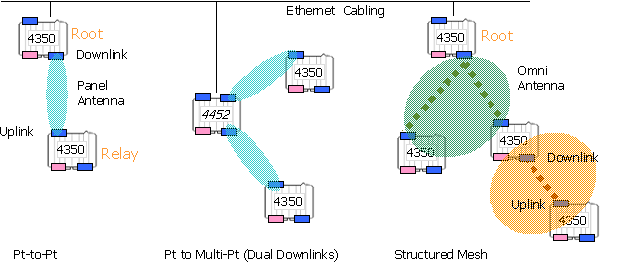
MD4250 is used for remote
video surveillance
and perimeter security.
MD4350 is a popular configuration with one 2.4GHz Access Point
radio for client service.
MD4452
MD4454 support two and four backhaul downlinks
respectively.
MD4458 support multiple service radios where
high client density is anticipated. It supports 2 or 3 client AP radios.
MD4455 MD4355
MD4325 use a scanning radio in
slot 3 to ensure rapid
switch over from node to node in a mobile setting.
Custom Model Configurations are supported, see Model Numbering
Scheme
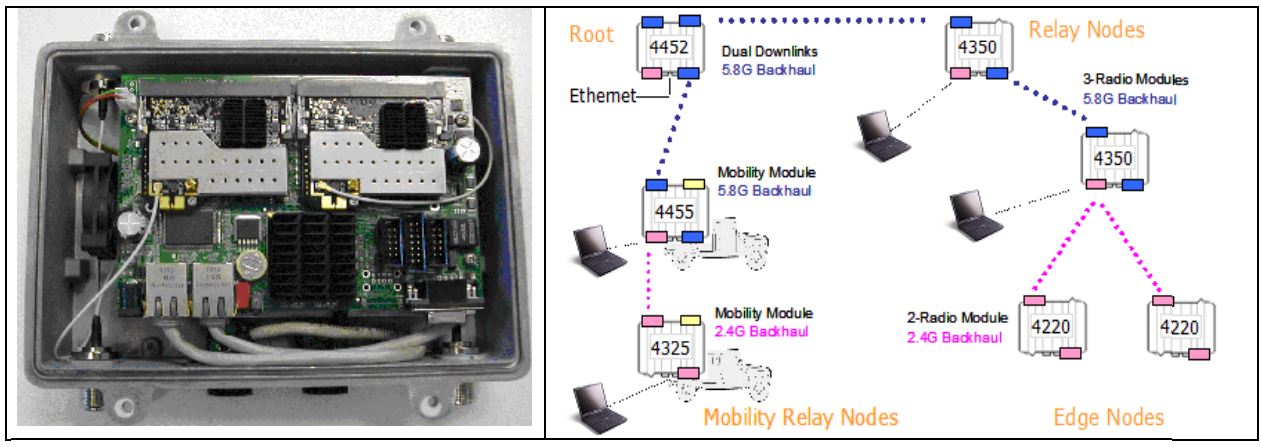
Bridging Across Multiple Networks.
Meshdynamics mesh nodes can bridge a 2.4 GHz sub tree with the 5.8GHz mesh
network tree.
The figure above shows how this level of flexibility is supported. There are
4 mini-PCI slots on the board, two on the bottom and two on top. Each of the
four slots can house a different frequency radio. This opens up some
interesting possibilities including 2.4 GHz backhaul systems being part of a
mesh with 5.8 GHz backhauls. Since the service and backhaul radios are
distinct, it is possible to use a service radio to bridge over from a 5.8
GHz backhaul to 2.4 GHz backhaul. The 4325 Mobility Relay node on the bottom
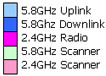
left has joined the mesh – even though the upper links are 5.8 GHz (blue) –
through the service radio (pink). See:
Radio and Protocol Agnostic
Approach
Man-wearable Single Radio Modules.
Meshdynamics Interoperable framework supports both
multi-radio and
single radio modules
(shown above). The compact multi-radio units form the core
Mobile Mesh Backhaul. Communications at the edge of the network
are supported by single radio mesh capable portable units to
provide communication and connectivity at the network edge.
GPS
Position Location Option.
See GPS Options.
The GPS
location information is transmitted periodically with the mesh node heart beat.
The mesh node location is automatically updated on the NMS.
The NMS uses imported maps and dynamically manages the background image movement
to ensure that the current location is correctly depicted.
P3MTM Persistent Mobile Mesh.
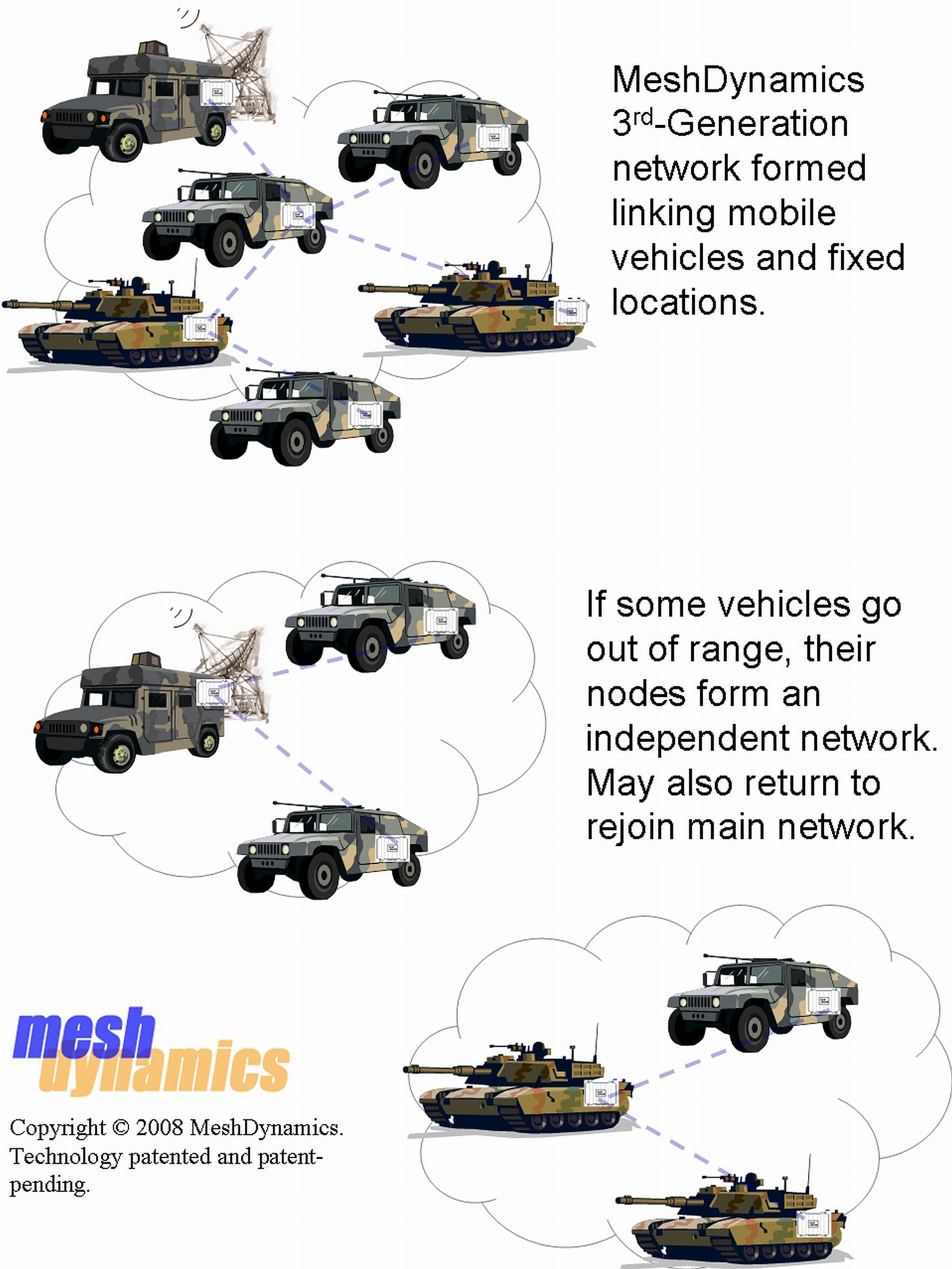
A cluster of mobile nodes automatically form a
network with each other. If the cluster physically
separates into two smaller clusters, each will then become
its own independent network. If two separate
clusters/networks physically come together, one single
network will form and all nodes + associated clients will
then be able to share data. In a
deployed combat environment in Iraq, vehicle-mounted nodes
demonstrated reliable connectivity between convoy vehicles in
simultaneous motion. Networks split and reformed dynamically
and in real time. Applications supported by Meshdynamics
systems operated flawlessly as vehicles moved through rugged terrain.
Illustration Press Release
Application Notes
Patent
Persistent Base VoiceTM (PBV).
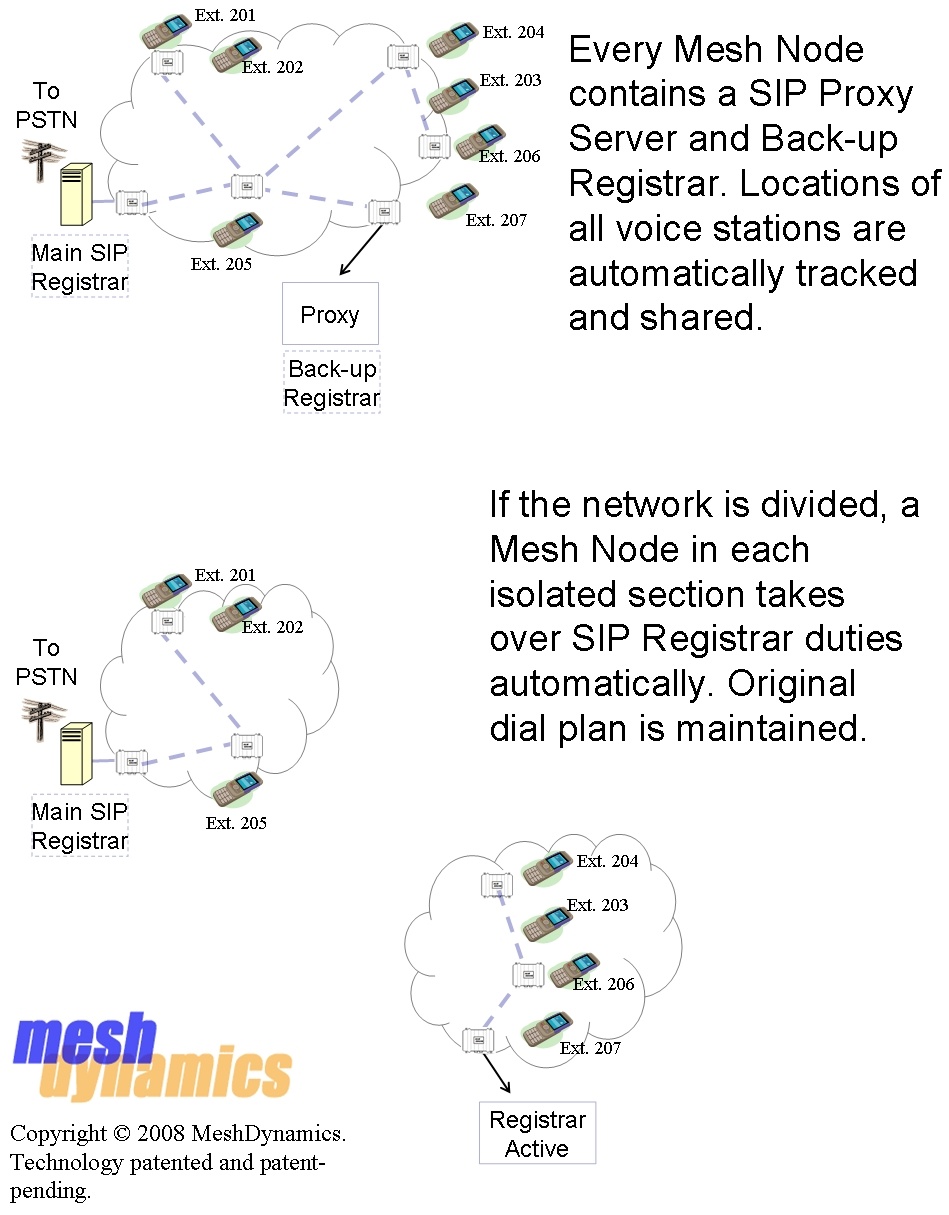
VOIP phones function even when the SIP gateway is not
reachable: the mesh nodes
act as a temporary proxy SIP server till nodes rejoin
the main mesh. Illustration Press
Release Application Notes
Patent
Network Aware
Machine Controller Framework
Machine controller applications, running on the mesh nodes, monitor and
control enterprise assets at the network edge.
More
Meshdynamics works closely with our source code licensees to simulate and
prototype OEM product offerings and solutions.
For more information please see:
The Abstracted Network for
Enterprises and the Internet Of Things
Related Links
 MD4000 Layout
Design. Root and relay placements, modeling uplink and downlink spreads,
antenna selection etc.
MD4000 Layout
Design. Root and relay placements, modeling uplink and downlink spreads,
antenna selection etc.
MD4000
Installation Guide.
Antenna selection, mounting and placement, model configuration, trouble
shooting.
MD4000 NMS
Software Download Software for configuring nodes. NMS is not
needed for the mesh network to run.
MD4000 NMS
Configuration Guide Detailed
instructions on setting SSID, Encryption,
QoS, VLANs etc.